
Three small automations that instantly make incident response faster
Save time during a breach by automating the small administrative tasks that slow responders down

Incident response is one of the areas in security operations where automation can deliver immediate value. The first hours of an incident can be full of repetitive administrative tasks. Folders must be created, evidence must be stored, communication channels must be opened and so on. None of these tasks are difficult in isolation. The problem is that they compound quickly, wasting precious time and attention span during those first intense hours.
This is where micro-automation can help. The goal is not to build a perfectly automated incident response process from the outset. The goal is to remove small, predictable sources of friction from the first 12 hours of an incident.
There is also no need to start with complex agentic workflows. AI agents such as Codex or Vibe can certainly support the incident commander over time. However, most teams should start with basic automations, such as Command Line Interfaces (CLIs) that responders can run reliably during a real incident. Once these are working, agentic tooling can be added on top.
At a basic level, getting your team to consistently micro-automate incident response requires three ingredients:
- Clear ownership by the on-call team, who must share lessons learned from incidents and automated repetitive tasks
- A central repository where incident responders and the on-call can store and improve automation scripts
- A handover process where each shift captures reusable automations
By doing this, incident response automation becomes part of daily operations rather than a side project that is always postponed. More importantly, it turns frontline experience into reusable improvements that compound over time.
In this post, we will cover three automations that can help security teams win back time during the first 12 hours of an incident. These automations come from direct field experience and have proven successful in reducing incident response time.
Automation 1: creating the incident folder
After an incident is acknowledged, the incident commander has three immediate priorities: understand what is happening, reduce liability and assemble the right team. All three depend on having a confidential and professional space to collaborate.
Without automation, responders often waste time creating folders, agreeing naming conventions and deciding where evidence should be stored. This is a poor use of attention and time. During an incident, every minute wasted on avoidable administration is a minute taken away from triage, containment or evidence collection.
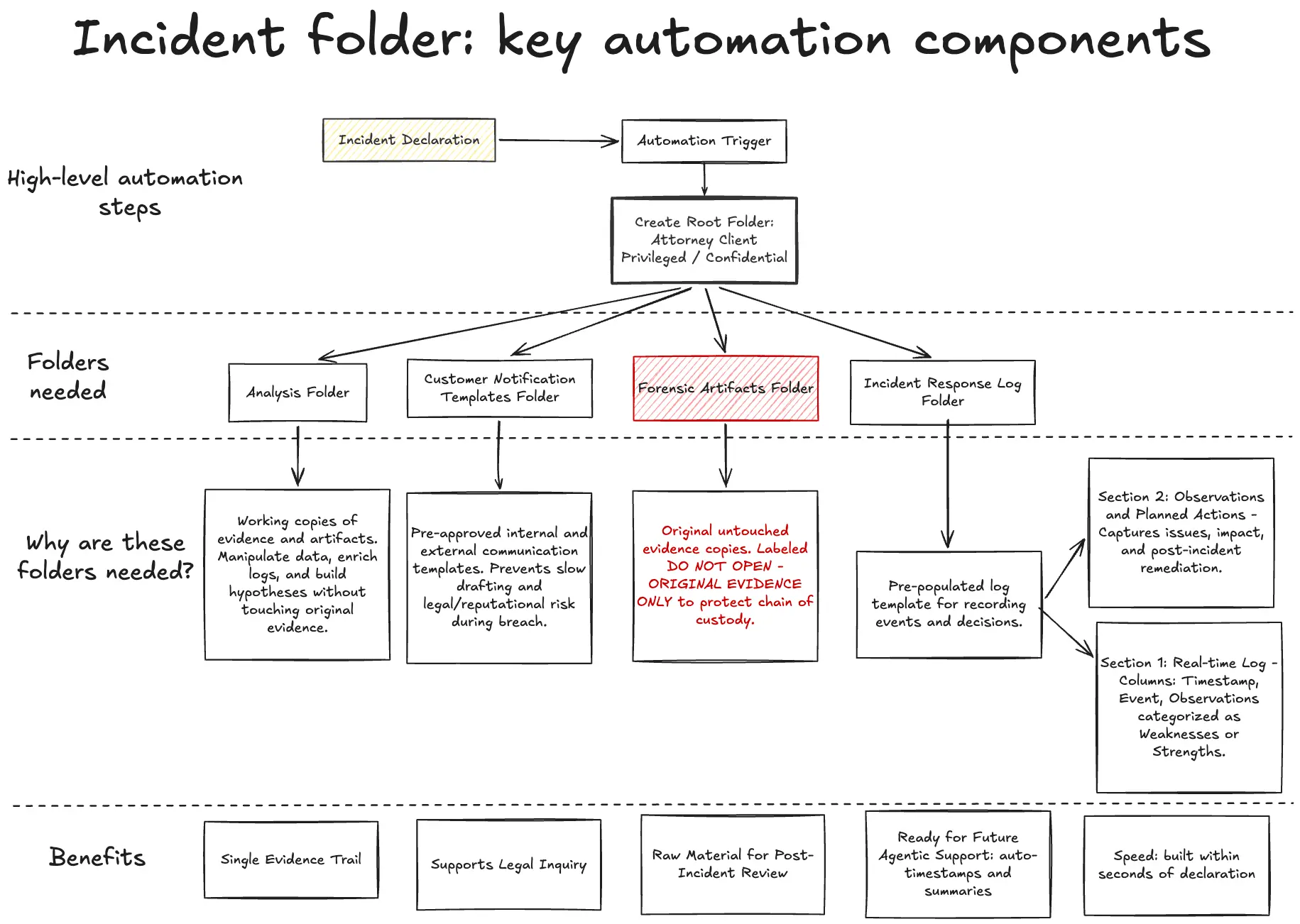
The first automation should therefore create a standard incident workspace immediately after declaration. At a minimum, the workspace should create a root folder marked as "Attorney Client Privileged (ACP)" or "Confidential" and include four subfolders:
- Analysis: the Analysis folder should contain working copies of evidence and artifacts used during the investigation. This is where responders can manipulate data, enrich logs and build working hypotheses without touching original evidence.
- Customer notification templates: the Customer notification templates folder should contain pre-approved internal and external communication templates. These should be ready before an incident occurs. Drafting customer-facing language from scratch during a breach is slow and introduces unnecessary legal and reputational risk.
- Forensic artifacts: the Forensic artifacts folder should be reserved for original, untouched copies of evidence. This folder should be clearly marked with a warning such as "DO NOT OPEN - ORIGINAL EVIDENCE ONLY". The purpose is to protect chain of custody and reduce the risk that responders accidentally alter files that may later be needed for legal, regulatory or insurance purposes.
- Incident response log: the Incident response log folder should contain a pre-populated log template. This template is one of the most important documents created during the incident. It records what happened, what the team did and why decisions were taken.
At a basic level, the log should contain two sections. The first is the real-time incident response log, with columns for timestamp, event and observations. Observations should be categorised as weaknesses or strengths where possible. The second is an observations and planned actions section, capturing each issue, its impact and the planned action to address it after the incident.
This structure may feel excessive when things are calm. During a real incident it becomes valuable very quickly. It gives the team a single evidence trail, supports legal inquiry and creates the raw material needed for a useful post-incident review.
Over time, this is also an obvious area for agentic support. An assistant could help pre-fill timestamps, summarise key events and extract observations from messages or notes. However, the first step is simpler: ensure that the right workspace exists within seconds of incident declaration.
Automation 2: creating confidential communication channels
The second automation should help the incident commander assemble the response team quickly and confidentially. The time it takes to setup communications is often underestimated. In the first hours of an incident, the commander may need to coordinate security, engineering, legal, privacy, customer support and executive stakeholders.
If communication channels are improvised, information can spread too widely or reach the wrong audience. If channels are created too slowly, responders lose time and context becomes spread across tools.
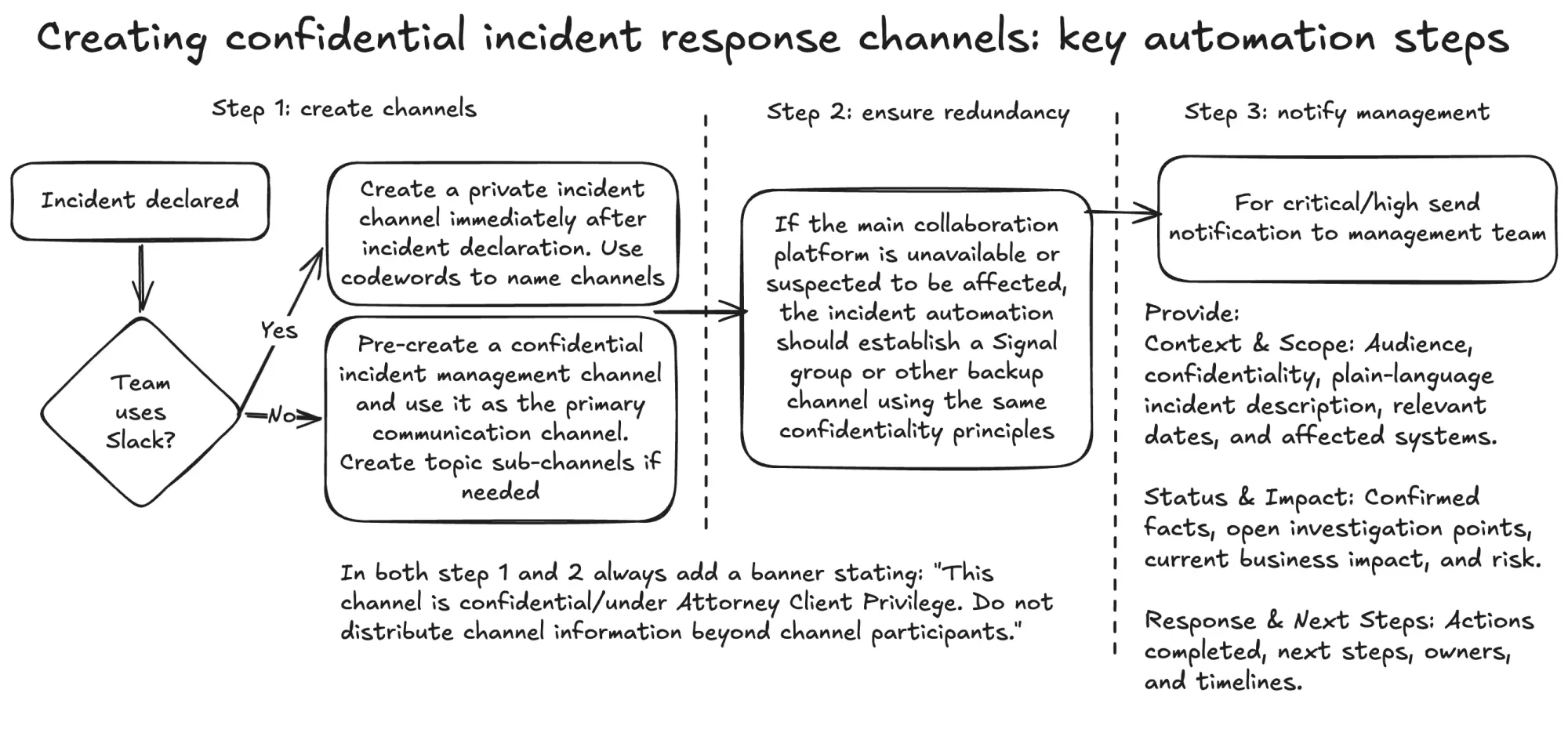
For Slack-based organisations, consider building an automation that creates a private incident channel immediately after incident declaration. The channel name should use a neutral codeword rather than a customer name, system name or obvious incident description. The channel header should include explicit confidentiality language, such as:
This channel is under ACP. Do not distribute channel information beyond channel participants.
The automation should also post a first message once the channel is created. This first message should act as the operating header for the incident. It should include the incident codeword, a link to the incident log, a short description of the current situation, immediate requirements for new responders and a reminder of confidentiality boundaries.
For organisations using Microsoft Teams, the automation options may be more limited depending on the environment. In that case, a practical approach is to pre-create a confidential incident management channel and use it as the primary communication channel. If needed, the incident response teams can create incident-specific sub-channels whenever possible, with access restricted to people who need to know.
Redundancy should also be planned. If the main collaboration platform is unavailable or suspected to be affected, the incident automation should be able to establish a Signal group or other backup channel using the same confidentiality principles.
The same communication automation should also support the notification of company management for high and critical incidents. The purpose of the first management notification is not to provide a complete briefing. It is to alert leadership that an incident is active, prepare them for potential customer or regulatory implications and tell them how and when they will receive updates.
A useful management notification should include:
- Audience and confidentiality boundaries
- Plain-language description of the incident
- Relevant dates and affected systems
- Confirmed facts
- Open investigation points
- Current business impact and risk
- Actions already completed
- Next steps, owners and timelines
When notifying management, it's important to separate facts from hypotheses. Management does not need speculation during the first hours of an incident so the automation should only contain facts and be explicit when it comes to unknowns. This ensures management gets enough context to understand that a potentially serious incident is underway and avoid being surprised later.
Automation 3: sending the first customer notification
Customer notifications are another area where small automations can deliver high value. Many organisations operate under contractual or regulatory requirements that can compress the timeline to send a first customer incident notification to 12 hours or less. Even when formal deadlines are longer, customers expect fast, facts-based communication when their data or services may be affected.
For this, two communications should be prepared in advance: the internal customer support briefing and the external customer notification.
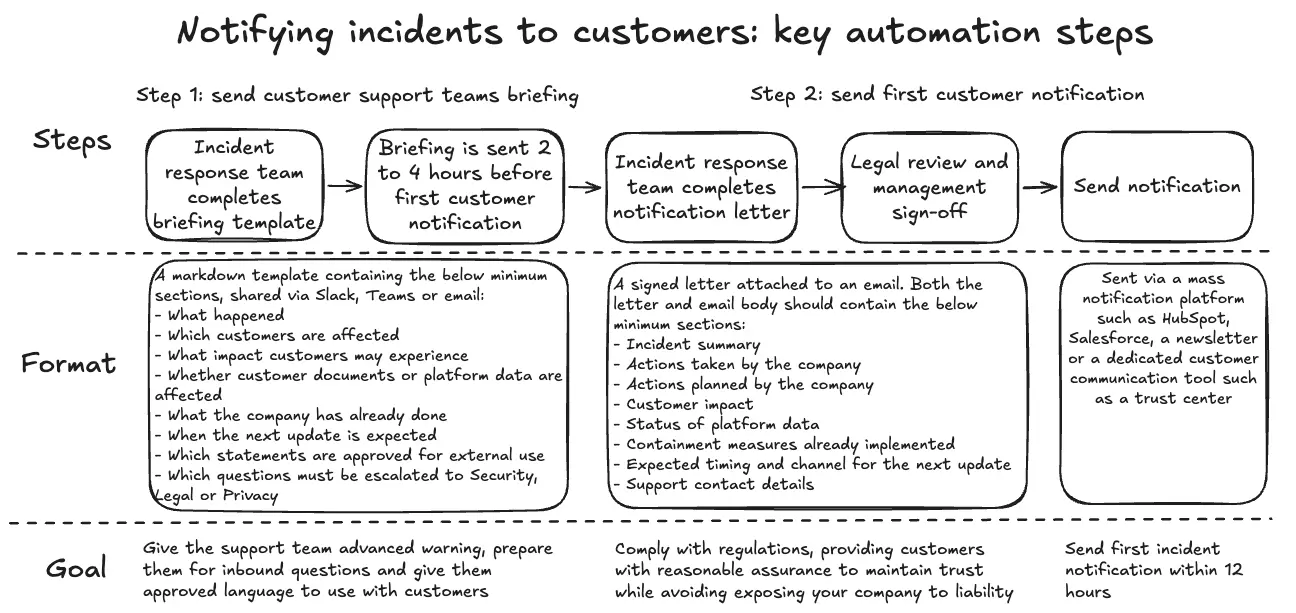
The customer support briefing should usually go out before customers are notified. The goal is to prepare the support team for inbound questions and give them approved language to use. A good rule of thumb is to distribute this briefing two to four hours before the first customer notification is sent, when operationally possible.
This briefing should be concise and structured as a practical FAQ. At a minimum, it should cover:
- What happened
- Which customers are affected
- What impact customers may experience
- Whether customer documents or platform data are affected
- What the company has already done
- When the next update is expected
- Which statements are approved for external use
- Which questions must be escalated to Security, Legal or Privacy
The distinction between "facts to empower customer support teams" and "approved external language" is critical. Support teams need enough context to answer customer questions calmly. At the same time, they need clear boundaries so they do not speculate or accidentally disclose information that has not been approved.
This briefing can be automated through a dedicated Slack channel, Teams channel or mailing list. The infrastructure should exist before the incident. During an actual breach, the automation should only need to populate the template with incident-specific facts and route it to the right audience for approval and distribution.
The external customer notification requires even more discipline. Ideally, it should be integrated with a mass notification platform such as HubSpot, Salesforce, a newsletter or a dedicated customer communication tool (such as a trust center). The automation should be able to extract relevant customer security contacts and populate a pre-approved notification template.
The customer notification should use a simple letter-style format. It should open with a clear subject line that references the incident date. It should then explain why the customer is receiving the message, including whether the customer reported the issue or has been identified as potentially affected.
The body of the notification should provide a concise summary of the issue, the current investigation hypothesis and the actions already taken. Where appropriate, it should also clarify whether there is evidence of platform compromise, data exposure or unauthorised access.
The middle section should move from facts to preserving customer trust. This is where the company should explicitly acknowledge its responsibility to safeguard customer data and explain what is being done to contain the issue. The notification should avoid unnecessary technical detail, but it should not become vague so customers receive clear information.
At a minimum, the notification should include:
- Incident summary
- Actions taken by the company
- Actions planned by the company
- Customer impact
- Status of platform data
- Containment measures already implemented
- Expected timing and channel for the next update
- Support contact details
The sign-off should come from accountable leaders, typically the CISO alongside equivalent management roles. This gives the message weight and makes accountability visible.
The value of automation here is straightforward. Manually sending dozens or hundreds of customer emails during the first hours of an incident is a poor use of the response team's capacity. Automating the template population, recipient extraction and distribution workflow can save hours. More importantly, it reduces the chance that customers receive inconsistent messages.
Why speed matters
The first 12 hours of an incident are critical to assembling a competent response and preserving customer trust. Regulatory duties, contractual obligations and customer expectations all push the team towards acting fast. At the same time, speed without structure creates mistakes. This is where micro-automation becomes useful: it helps teams move quickly through administrative tasks while freeing up valuable thinking space during the acute phases of incident response.
Incident response automation does not need to start with a large platform purchase or a complex AI workflow. Teams can begin with three small automations that help create the incident workspace, automatically open confidential communication channels and prepare first customer notifications.
Each automation removes a small, yet potentially costly, source of time waste. Together, they create more thinking space for the incident commander and the response team so they can focus on doing their job. They also create the foundations for more advanced support later, including an incident response CLI tool or agentic assistant that helps the commander during the first 12 hours.
The best way to start is simple. Pick one automation, build it, test it during a tabletop exercise and improve it after the next handover. Then repeat. Over time, these small improvements will compound into a response capability that is faster, calmer and that helps preserve precious customer trust when it matters most.